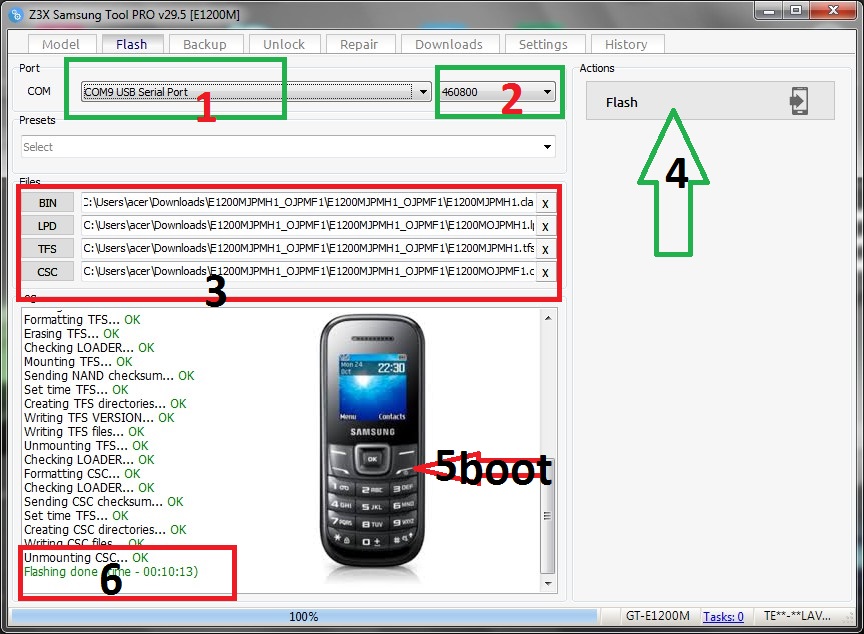
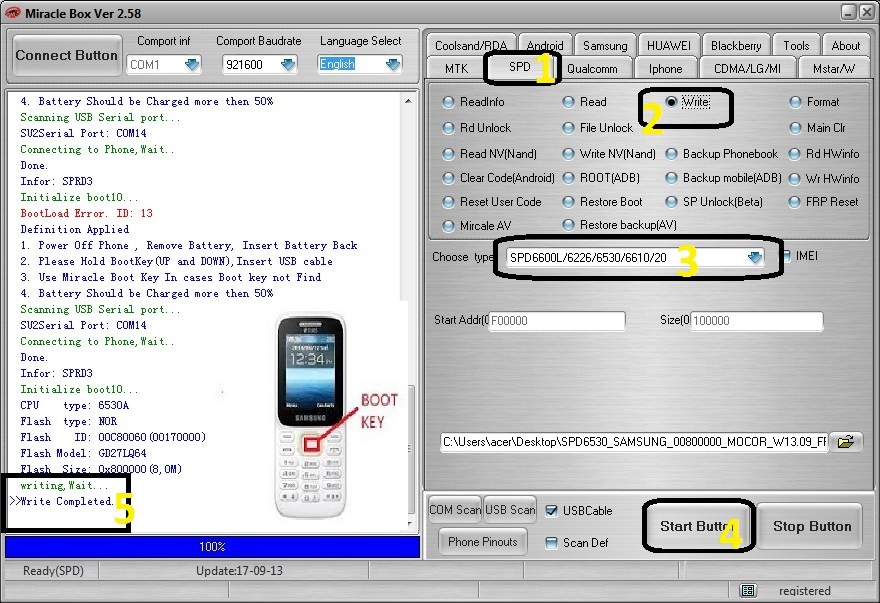
تعريب وتفليش هاتف سامسونغ GT-E1200M على z3x

//pagead2.googlesyndication.com/pagead/js/adsbygoogle.js (adsbygoogle = window.adsbygoogle || []).push({});

تعريب وتفليش هاتف سامسونغ E1200M على z3x

 لسلام عليكم ورحمة الله وبركاته زوار techno2mk  في هذه التدوينة  الحصرية التي يبحت عنها الكتير اقدم لكم  فلاش لتعريب لهاتف GT-E1200M تفليش على z3x

//pagead2.googlesyndication.com/pagead/js/adsbygoogle.js (adsbygoogle = window.adsbygoogle || []).push({});
تعريب وتفليش هاتف سامسونغ GT-E1200M على z3x


تعريب وتفليش هاتف سامسونغ E1200M على z3x

تعريب وتفليش هاتف سامسونغ GT-E1200M على z3x
E1200MJPMH1_OJPMF1
E1200MJPLD1
تعريب وتفليش هاتف سامسونغ GT-E1200M على z3x
وبالتوفيق للجميع تقبلو آحر تحياتي آخوكم احمد

//pagead2.googlesyndication.com/pagead/js/adsbygoogle.js (adsbygoogle = window.adsbygoogle || []).push({});

تحميل أداة Universal Advance Unlocker

//pagead2.googlesyndication.com/pagead/js/adsbygoogle.js (adsbygoogle = window.adsbygoogle || []).push({});

تحميل أداة Universal Advance Unlocker 

تحميل أداة Universal Advance Unlocker

تحميل أداة Universal Advance Unlocker 

تحميل أداة Universal Advance Unlocker

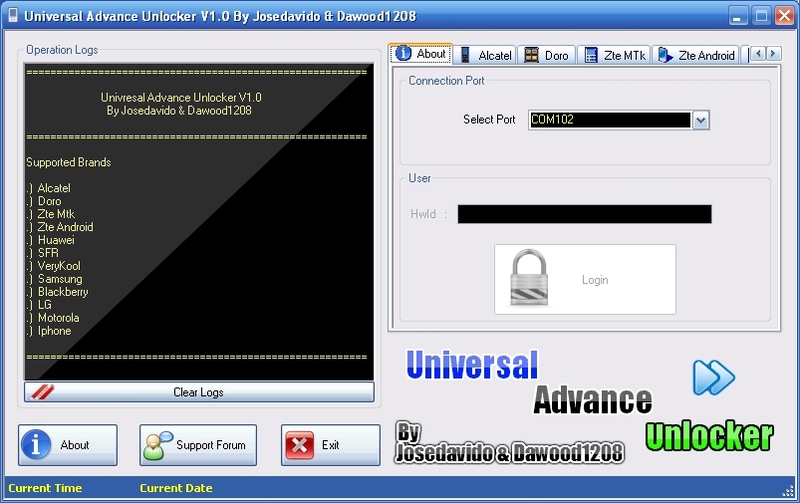
إليك برنامج فتح العلامة التجارية الجديدة (Universal 
Advance Unlocker) الذي يسمح لك بفتح الكثير من طراز الهاتف مجانًا.

إنه سهل الاستخدام للغاية ويتكون أساسا من الآلات الحاسبة.

كما يسمح أيضًا بفتح أو إصلاح iPhone الذي لم يعد به شبكة wifi. (للموديلات القديمة).

يمكنك أيضًا إلغاء قفل حماية الشاشة (إلغاء قفل النقش) لـ Samsung Android إذا كنت لا تتذكر الجمع.

للعمل ، يحتاج البرنامج إلى إطار Net 4 الخاص بـ Microsoft هنا:


//pagead2.googlesyndication.com/pagead/js/adsbygoogle.js (adsbygoogle = window.adsbygoogle || []).push({});

تثبيته ، إعادة تشغيل جهاز الكمبيوتر الخاص بك ومن ثم يمكنك استخدام Universal Advance Unlocker بشكل كامل

فيما يلي قائمة بالموديلات والوظائف المتوافقة المتاحة:

Alcatel
EL03
MANDARINA(DUCK)
MISS(SIXTY)
OT-C700
OT-C701
OT-C707
OT-C717
OT-C820
OT-C825
OT-S215
OT-S218
OT-S319
OT-S320
OT-S321
OT-S520
OT-V670
OT-V770
PLAYBOY
.
Doro
Doro 345
Doro 345
Doro 345 GSM
Doro 409
Doro 409s
Doro 410
Doro 410s
Doro 610
Doro 610s
.
Zte Mtk
A261
GR230
GX760
GX761
Orange Vegas
T-Mobile Vairy Touch
vodafone indie
X760
X761
X960
X990
X990D
Easy 50
Easy 10
Easy 1
Dallas
Vodafone 547
Etc…
.
Zte Android
X850
Link
Xiang
Blade
N61
Mercury
811
Raise
E810
SFR 552
T-Mobile Zest
Softstone
Silverbelt
BlueBelt
BlueBelt II
Orange
SanFransisco
Vodafone 1230/1231
A5
.
Huawei Modem
E220
K3520
K3565
K3715
E1552
E155
E156
E156G
E160
E160G
E161
E166
E169
E169G
E170
E172
E176
E180
E182
E196
E226
E270
E271
E272
E510
E612
E618
E620
E630
E630+
E660
E660A
E800
E870
E880
EG161
EG162G
EG602
EG602G
voda K2540
voda K3515
voda K3520
voda K3565
voda K3520
voda K3565
.
SFR
SFR 114
SFR 132
SFR 231
SFR 232
SFR 241
SFR 251
SFR 341
SFR 342
SFR 343
SFR Messenger Edition 251
.
VeryKool
i200
.
Samsung
Lire les infos du téléphone
Désactiver verrouillage écran
.
BlackBerry
Lire les infos du téléphone
Reset du téléphone
.
LG
Lg kg110
Réinitialisation du téléphone
Calculer code de déblocage

//pagead2.googlesyndication.com/pagead/js/adsbygoogle.js (adsbygoogle = window.adsbygoogle || []).push({});

Motorola
p2k
Lire les infos du téléphone
Master Reset
Réinitialiser code utilisteur ou code de sécurité
Iphone
Réparation iPhone sans wifi (Ancien modèles)
Profitez en pour débloquer vos téléphone simplement

//pagead2.googlesyndication.com/pagead/js/adsbygoogle.js (adsbygoogle = window.adsbygoogle || []).push({});

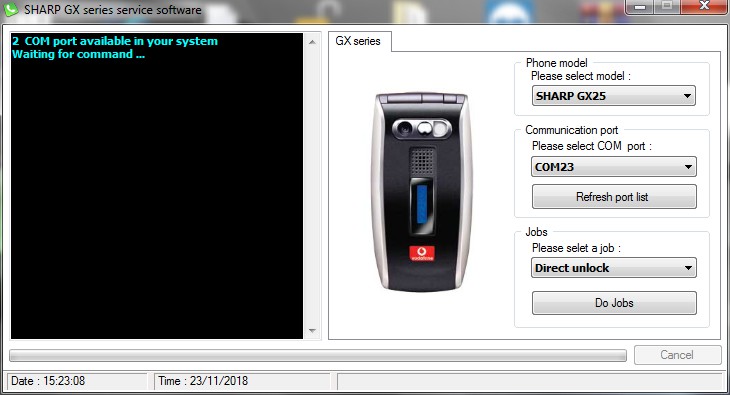
unlock sharp gx10 gx15 gx17 gx25 gx29 free for sharp unlocker

//pagead2.googlesyndication.com/pagead/js/adsbygoogle.js
(adsbygoogle = window.adsbygoogle || []).push({});

unlock sharp gx10 gx15 gx17 gx25 gx29 free for sharp unlocker

unlock sharp gx10 gx15 gx17 gx25 gx29 free for sharp unlocker
unlock sharp gx10 gx15 gx17 gx25 gx29 free
//pagead2.googlesyndication.com/pagead/js/adsbygoogle.js
(adsbygoogle = window.adsbygoogle || []).push({});
unlock sharp gx10 gx15 gx17 gx25 gx29 free for sharp unlocker
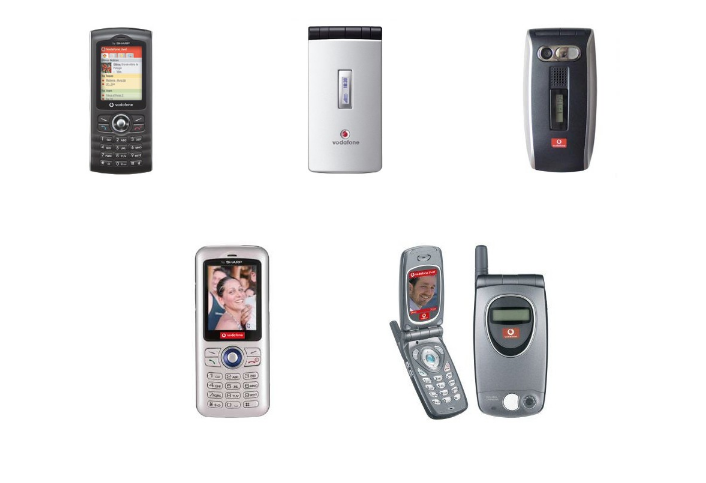
قائمة الموديلات المتوافقة أعلاه
 Sharp Gx 10
 Sharp Gx 15
 Sharp Gx 17
 Sharp Gx 25
 Sharp Gx 29


التعليمات التالية:

1- قم بتنزيل sharp unlocker

//pagead2.googlesyndication.com/pagead/js/adsbygoogle.js
(adsbygoogle = window.adsbygoogle || []).push({});


2 – تحميل برامج تشغيل sharp unlocker

 usb driver
www.sharp-phone.com/contents/downloads/drivers/gx29_modem_fr.exe
3- يجب أن يكون لديك كبل USB تسلسلي ، أو مفتاح Bluetooth لتتمكن من كتابة أو تنسيق diag لأنه من الضروري الاتصال عبر الكمبيوتر.

4- الهدف هو الدخول في اختبار وضع الهاتف المحمول.

5- يجب أن تظهر على شاشة الهاتف المحمول 4 نجوم.

6- لهذا يجب عليك استخدام البرنامج “ورشة عمل شارب”.

7- بمجرد تشغيل Workshop sharp ، اختر منفذ com ونوع الهاتف المحمول وانقر فوق إلغاء القفل.

8- سيتم إعادة تشغيل الهاتف المحمول وستظهر النجوم الأربعة.

9- اضغط على الرقم 1 على الهاتف المحمول ، ستختفي النجوم.

10- اجعل 99 على الهاتف المحمول.

11- اضغط على المفتاح الأيمن أعلى لوحة مفاتيح الهاتف المحمول.

12 – اضغط على 3 لفتح (أو 1 لإعادة تعيين بسيط من رموز المستخدم).

13- اضغط على المفتاح الأيمن أعلى لوحة مفاتيح الهاتف المحمول.

14- اترك حتى 100٪ أو “انتهى”.

15- اضغط على المفتاح الأيمن أعلى لوحة مفاتيح الهاتف المحمول بشكل متكرر حتى يخرج.

16- يتم إلغاء قفل الهاتف المحمول.

//pagead2.googlesyndication.com/pagead/js/adsbygoogle.js


تحميل التعليمات

1-تمرير الارتباط anonymizer بالنقر فوق الزر “تخطي هذا الإعلان”.

(هذا يمنع تمحى الروابط الخاصة بنا من قبل المضيف)

2- بمجرد الدخول إلى Google Drive ، انقر على ملف وتنزيل أو Ctrl + S.

3- هنا يتم تنزيل ملفاتك.

//pagead2.googlesyndication.com/pagead/js/adsbygoogle.js
(adsbygoogle = window.adsbygoogle || []).push({});


وكمكافأة:

لإلغاء تأمين GX10 حاد لا حاجة للكابل ، فقط حسب الكود:


1- قم بتشغيل الهاتف المحمول باستخدام بطاقة تشغيل صالحة.

2- على الهاتف المحمول: * 01763 * 6371 # ثم اضغط على “M”

3- في القائمة اذهب إلى: SETTINGS / SELECT / SECURITY

4- في قائمة الأمن ، انتقل إلى MEP LOCKS / SELECT

5- مارك 0000 كرمز الحماية.

6- في القائمة ، انتقل إلى NETWORK واختر DESACTIVATE

7- اختر SELECT وقم بتمييزها على 812664697614

8- اختر “موافق” وإجابات الجوال “تم” ثم تم إلغاء قفل الهاتف المحمول.

unlock sharp gx10 gx15 gx17 gx25 gx29 free for sharp unlocker

Instructions :

1- Télécharger sharp unlocker


2- Téléchargez les Driver usb et le guide.
http://www.sharp-phone.com/contents/europe/gx29_fr.html
3- Vous devez disposez d’un câble usb série, ou d’une clé bluetooth pour pouvoir écrire ou formater le diag car il faut une communication via le pc.

4- Le but est d’entrer dans le test mode du gsm.

5- Sur l’écran du gsm doit apparaître 4 étoiles.

6- Pour cela il faut se servir du logiciel « sharp Workshop ».

7- Une fois sharp Workshop.exe lancé, choisir le port com et le type de gsm puis cliquez sur unlock.

8- Le gsm redémarrera et les 4 étoiles vont apparaître.

9- Cliquez sur 1 sur le gsm, les étoiles vont disparaître.

10- Faites 99 sur le gsm.

11- Pressez la touche droite en haut du clavier du gsm.

12- Pressez 3 pour débloquer (ou 1 pour un reset simple des codes utilisateurs).

13- Pressez la touche droite en haut du clavier du gsm.

14- Laissez faire jusqu’à 100% ou « finished ».

15- Pressez plusieurs fois la touche droite en haut du clavier du gsm jusqu’à ce qu’il s’éteigne.

16- Le gsm est débloqué.


Instructions de téléchargement

1- Passez l’anonymiseur de lien en cliquant sur le bouton Orange Skip this Ad.

(Cela évite que nos liens soit effacés par l’hébergeur)

2- Une fois sur Google Drive, cliquez sur Fichier et Télécharger ou sur Ctrl+S.

3- Voila vos fichiers sont en cours de téléchargement.

//pagead2.googlesyndication.com/pagead/js/adsbygoogle.js
(adsbygoogle = window.adsbygoogle || []).push({});


Et en bonus :

Pour débloquer un sharp GX10 pas besoin de câble, c’est seulement par code :


1- Allumez le gsm avec une carte de l’opérateur valide.

2- Faites sur le gsm: *01763*6371# et appuyer sur « M »

3- Dans le menu allez à: SETTINGS / SELECT / SECURITY

4- Dans le menu SECURITY, allez à MEP LOCKS / SELECT

5- Marquez 0000 comme security code.

6- Dans le menu, allez dans NETWORK et choisir DESACTIVATE

7- Choisir SELECT et marquez 812664697614

8- Choisir « ok » et le gsm répond « Done » alors le gsm est débloqué.

//pagead2.googlesyndication.com/pagead/js/adsbygoogle.js
(adsbygoogle = window.adsbygoogle || []).push({});

Download CPH1831EX_11_A.12 OPPO R15 Pro Stock Firmware Flash File

//pagead2.googlesyndication.com/pagead/js/adsbygoogle.js (adsbygoogle = window.adsbygoogle || []).push({});

Download CPH1831EX_11_A.12 OPPO R15 Pro Stock Firmware Flash File

//pagead2.googlesyndication.com/pagead/js/adsbygoogle.js (adsbygoogle = window.adsbygoogle || []).push({});

Latest Software Version for OPPO R15 Pro

Version No.: CPH1831EX_11_A.12

Size: 2.0GBM

Update Date: 2018-10-11

Download Time: 1181
http://downloads.oppo.com.s3.amazonaws.com/firmware/CPH1831/CPH1831EX_11_A.12_OTA_0120_all_20181010.ozip

//pagead2.googlesyndication.com/pagead/js/adsbygoogle.js (adsbygoogle = window.adsbygoogle || []).push({});

Update the software version on your OPPO smartphone

//pagead2.googlesyndication.com/pagead/js/adsbygoogle.js (adsbygoogle = window.adsbygoogle || []).push({});

  Update the software version on your OPPO smartphone


Learn how to update your OPPO phone to the latest software version.
Applicable for all OPPO smartphones.

Should you update the software version?

Almost every smartphone receives notifications of system updates. You may wonder whether you should update your device.
The answer is YES.

The benefits of system updates include:

  1. Optimizing the system performance.
  2. Prolonging your battery life.
  3. Developing compatibility with more third-party apps.
  4. Enhancing the system stability.

Update your OPPO smartphone

There are four ways to update your device.

Notice

Back up your data before update.
  • Plug your OPPO phone into power, or keep the battery level over 40%.
  • The update process takes some time. Do not operate or power off your device during the process.
  • DO NOT root the phone yourself, for that might cause damage to your system, and the warranty service will be terminated immediately.

Update your OPPO phone wirelessly

  1. Connect to a working Wi-Fi or Mobile network. The system will automatically show new update, if any. You can see a notification on the “System updates” icon, otherwise it will show “It is already the latest version”.
    ImageImage
  2. Download the firmware. Download under a Wi-Fi network to avoid the consumption of your mobile data.
  3. Click [System Updates]. Your device will reboot and start updating, which will take a few minutes.
    Image

Update with SD Card (Recovery Update)

Update with SD card is mainly used if the phone freezes at a certain interface or OPPO logo, or can’t boot but can get into Recovery Mode.
  1. Go to OPPO Official website > click Support > Software Updates , download the firmware to the root directory of your SD Card (A root directory is the top-most directory in SD Card file systems) .
  2. Insert your SD card, then power off the phone.
  3. Press and hold the Power and Volume Down buttons, until your phone enters Recovery Mode.
  4. Under the Recovery Mode, click [Install from storage device] > [Install from SD] , find the update package.
    ImageImageImage
  5. Click the firmware. A confirmation message will appear on your screen. Click Yes. Your device will reboot and start updating, which will take some time.

Online update (keep data)

For ColorOS 5.0 and above, Online update (keep data) in Recovery Mode is to download the firmware of latest system, which is the same as go to website to download a firmware. Before that please be sure that Wifi is connected and sufficient battery power.
  1. Press and hold the Power and Volume Down buttons, until your phone enters Recovery Mode.
  2. Under the Recovery Mode, click [Online update (keep data)], connect Wifi and please do not perform other operations in the process until successful update.

Update with the assistance of local OPPO Service Center

If you can’t update by yourself, please backup the important data, bring your mobile phone, invoice and warranty card and go to the local OPPO customer service center to ask professional maintenance engineer for help. To find the nearest service center, you can go to OPPO official website > Support > Service Center.
* Pictures, settings and paths might differ from those of your phone, but that do not affect the description in this article.?

//pagead2.googlesyndication.com/pagead/js/adsbygoogle.js (adsbygoogle = window.adsbygoogle || []).push({});

Download CPH1879 Oppo R17 Stock Firmware Flash File

//pagead2.googlesyndication.com/pagead/js/adsbygoogle.js (adsbygoogle = window.adsbygoogle || []).push({});

 Download CPH1879 Oppo R17 Stock Firmware Flash File
 Download CPH1879 Oppo R17 Stock Firmware Flash File


//pagead2.googlesyndication.com/pagead/js/adsbygoogle.js (adsbygoogle = window.adsbygoogle || []).push({}); Latest Software Version for OPPO R17
Version No.: CPH1879EX_11_A.04
Size: 2765M
Update Date: 2018-11-21

Download Time: 472

http://downloads.oppo.com.s3.amazonaws.com/firmware/CPH1879/CPH1879EX_11_A.04_OTA_0044_all_201810280239.ozip

//pagead2.googlesyndication.com/pagead/js/adsbygoogle.js (adsbygoogle = window.adsbygoogle || []).push({});

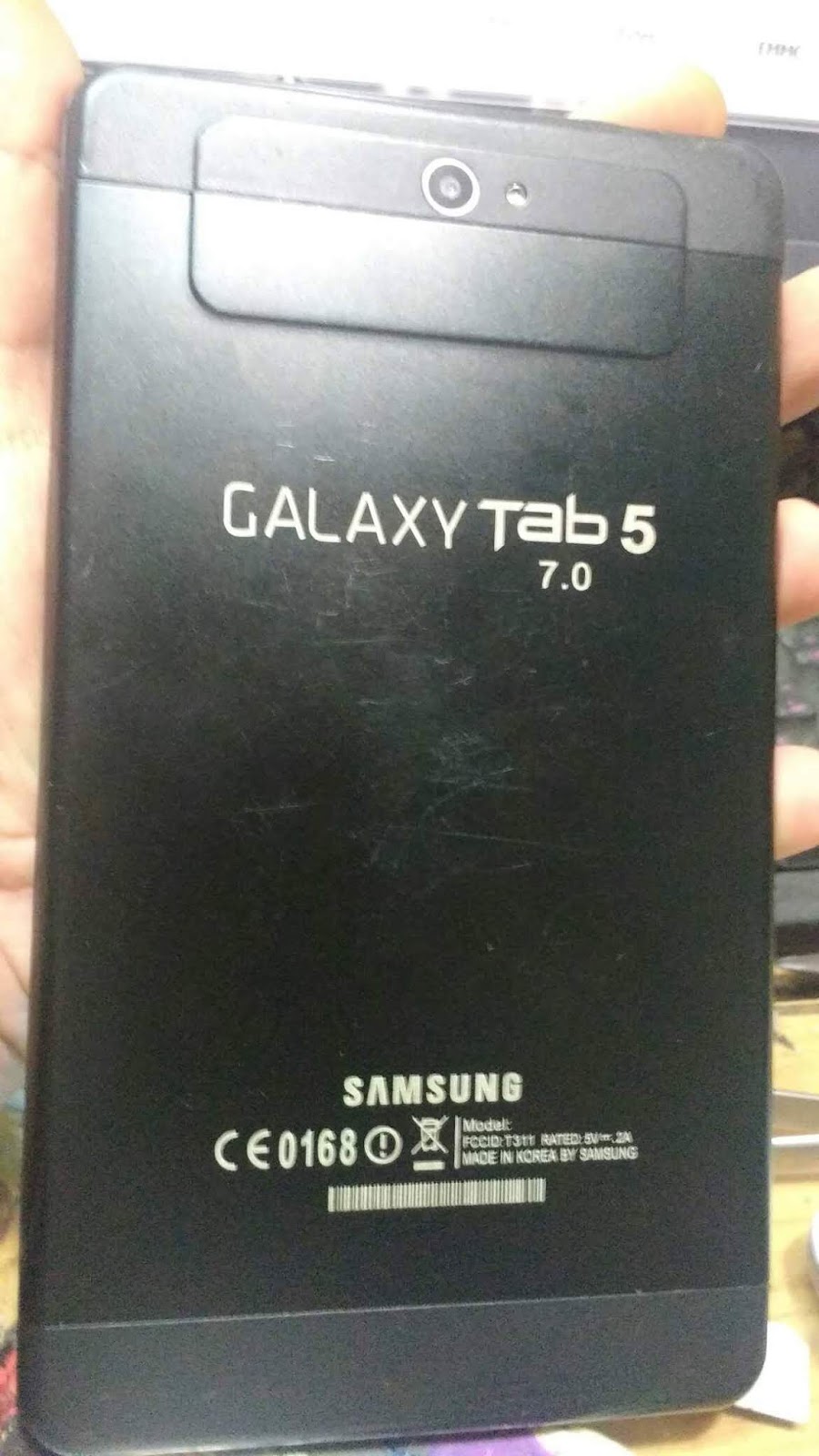
samsung galaxy tab 5 7.0 clone firmware MT6572 4.2.2

//pagead2.googlesyndication.com/pagead/js/adsbygoogle.js
(adsbygoogle = window.adsbygoogle || []).push({});

samsung galaxy tab 5 7.0 clone firmware MT6572 AndroidVer: 4.2.2

السلام عليكم ورحمة الله وبركاته متابعي مدونة techno2mk مع درس جديد وحصري كالعادة اقدم اليكم في هذه التدوينة الرائعة  والذي يبحت عنه الكثير  و هو فلاش galaxy tab 5 من اجل معالجة كافة مشاكل الموجودة بالجهاز وكاذلك ملف NVDATA المسؤول عن الشبكة والسريال ولن اطيل عليكم اترككم مع تحميل الفلاش
samsung galaxy tab 5 7.0 clone firmware MT6572  4.2.2
samsung galaxy tab 5 7.0 clone firmware MT6572  4.2.2
[AP] : Initial info read Ok!

Brand     : alps
ProdName  : m72_emmc_s6_pcb22_ddr1
ProdModel : M706
Device    : m72_emmc_s6_pcb22_ddr1
AndroidVer: 4.2.2
MTKxCPU   : MT6572
MTKxPRJ   : ALPS.JB3.MP.V1.12

(adsbygoogle = window.adsbygoogle || []).push({}); SECURITY : 

IMEI_SW [1] : 356790800470000
IMEI_SW [2] : 356790800475000
BTMAC Addr  : 000046657201
WiFi MAC    : 000000000000

MODEM : 
BaseBand  : MT6572_S00_MOLY_WR8_W1315_MD_WG_MP_V8_P4_1_wg_n
EXTRA : 
LCD [0] : hx8264d_rgb
LCD Res : 800×480
TOUCH [0] : gslX680_s6_id_pcb22_m706_proximity
CAM [0] : gc2035_yuv
CAM [1] : gc0308_yuv
CAM [2] : gc0309_yuv
CAM [3] : gc0329_yuv_kenuo
CAM [4] : gc0328_yuv
CAM [5] : gc0311_yuv
CAM [6] : siv121du_yuv
CAM [7] : bf3920_yuv
CAM [8] : bf3703_yuv
CAM [9] : bf3a03_yuv
CAM [10] : sp0a19_yuv
CAM [11] : sp2518_yuv
CAM [12] : gc2145_yuv
CAM [13] : gc2155_yuv
CAM [14] : hm5065_yuv
CAM [15] : gt2005_yuv
CAM [16] : gc0312_yuv
CAM [17] : sp0838_yuv
MODEM : sn_m72_wet_1_wg_m706_coclok_new
LOCALE : en_US ms_MY zh_CN zh_TW km_KH ja_JP fa_IR fa_AF hi_IN bn_IN es_ES ru_RU pt_BR fr_FR de_DE tr_TR it_IT in_ID vi_VN ar_EG my_ZG th_TH hdpi -sw600dp -sw720dp  pt_PT   nl_NL el_GR hu_HU tl_PH ro_RO cs_CZ

تحميل الفلاش

samsung galaxy tab 5 7.0 clone firmware MT6572  4.2.2

تحميل NVDATA

samsung galaxy tab 5 7.0 clone firmware MT6572  4.2.2

//pagead2.googlesyndication.com/pagead/js/adsbygoogle.js
(adsbygoogle = window.adsbygoogle || []).push({});

وبالتوفيق للجميع تقبلو آحر تحياتي آخوكم احمد

//pagead2.googlesyndication.com/pagead/js/adsbygoogle.js
(adsbygoogle = window.adsbygoogle || []).push({});

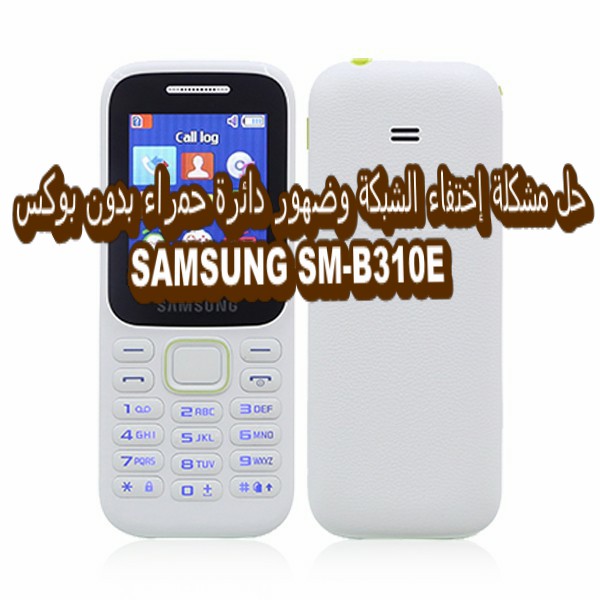
حل مشكلة إختفاء الشبكة وضهور دائرة حمراء بدون بوكس SAMSUNG SM-B310E

 حل مشكلة إختفاء الشبكة وضهور دائرة حمراء بدون بوكس  SAMSUNG SM-B310E  

//pagead2.googlesyndication.com/pagead/js/adsbygoogle.js
(adsbygoogle = window.adsbygoogle || []).push({});

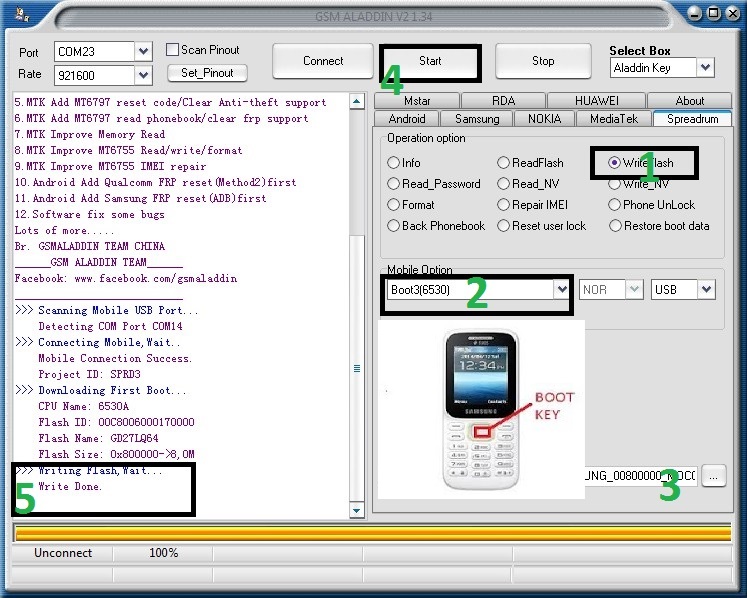
 لسلام عليكم ورحمة الله وبركاته زوار techno2mk   في هذه التدوينة  الحصرية التي يبحت عنها الكتير اقدم لكم  فلاش لهاتف   SAMSUNG SM-B310E ذو معالج spd مسحوبة بواسطة Gsm Aladdin   بصيغة bin لحل مشكلة إختفاء الشبكة وضهور دائرة حمراء

 حل مشكلة إختفاء الشبكة وضهور دائرة حمراء بدون بوكس  SAMSUNG SM-B310E

//pagead2.googlesyndication.com/pagead/js/adsbygoogle.js (adsbygoogle = window.adsbygoogle || []).push({});  حل مشكلة إختفاء الشبكة وضهور دائرة حمراء بدون بوكس  SAMSUNG SM-B310E 

تابع طريقة الفلاش في الفيديو


 تفليش بواسطة  Gsm Aladdin CRACK

او بي

 تفليش بواسطة  Box Miracle CRACK


 حل مشكلة إختفاء الشبكة وضهور دائرة حمراء بدون بوكس  SAMSUNG SM-B310E

 حل مشكلة إختفاء الشبكة وضهور دائرة حمراء بدون بوكس  SAMSUNG SM-B310E  

 حل مشكلة إختفاء الشبكة وضهور دائرة حمراء بدون بوكس  SAMSUNG SM-B310E

تحميل Gsm Aladdin CRACK

 حل مشكلة إختفاء الشبكة وضهور دائرة حمراء بدون بوكس  SAMSUNG SM-B310E

//pagead2.googlesyndication.com/pagead/js/adsbygoogle.js
(adsbygoogle = window.adsbygoogle || []).push({});

 تحميل  Box Miracle CRACK

 حل مشكلة إختفاء الشبكة وضهور دائرة حمراء بدون بوكس  SAMSUNG SM-B310E

تحميل فلاش SAMSUNG SM-B310E

 حل مشكلة إختفاء الشبكة وضهور دائرة حمراء بدون بوكس  SAMSUNG SM-B310E
وبالتوفيق للجميع تقبلو آحر تحياتي آخوكم احمد

//pagead2.googlesyndication.com/pagead/js/adsbygoogle.js
(adsbygoogle = window.adsbygoogle || []).push({});


//pagead2.googlesyndication.com/pagead/js/adsbygoogle.js
(adsbygoogle = window.adsbygoogle || []).push({});

رموز الكاتيل السرية Alcatel OT-E221l secret codes

//pagead2.googlesyndication.com/pagead/js/adsbygoogle.js (adsbygoogle = window.adsbygoogle || []).push({});

رموز الكاتيل السرية  Alcatel OT-E221l secret codes  
Display IMEI.IMEI (International Mobile Equipment Identity) is a unique 15-digit number assigned to all cellular devices. We can use this number to block a mobile phone from being used by another person or phone company if it has been lost or stolen.
Use this to displays your Alcatel handset’s IMEI NumberIMEI (International Mobile Equipment Identity) is a unique 15-digit number assigned to all cellular devices. We can use this number to block a mobile phone from being used by another person or phone company if it has been lost or stolen.. The same code works from all other GSM handsets.
*#06#

Enter Service Menu.
Use this to Enter your Alcatels Service Menu.
*#000000#

Master Reset (Sim In Phone).
Use this to Master Reset your Alcatel with a sim card inside.
###337*07#

Factory Reset (Sim In Phone).
Use this to Factory Reset your Alcatel with a sim card inside.
###847#

Engineering Menu 1 (Sim In Phone).
Use this to enter the Engineering Menu on your Alcatel with a sim card inside.
###847#

Factory Reset (Sim In Phone).
Use this to Reset to Factory Defaults on your Alcatel with a sim card inside.
###874#

Add Barring Groups.
Use this to Add Barring Groups on your Alcatel.
###765*02#

Deactivate Barring Groups.
Use this to Deactivate Barring Groups on your Alcatel.
###765*78#

Locking to Network.
Use this Lock the Network on your Alcatel.
###765*05#

Unlocking from Network.
Use this unlock the Network on your Alcatel.
###765*05#

Erase Network.
Use this erase the Network on your Alcatel.
###765*05#

###847# – Reset to Factory Defaults (with sim)
###765*02# – Add Barring Groups
###765*05# – Locking To Network
###765*07# – Unlocking From Network
###765*78# – Deactivate Barring Groups
###337*07# – Phone restarts itself.

Service Codes For E-Series:
*#8273*# – Network Services
###847# – General reset
*7528*# – Simlock Flags
*#7253*# – Total call duration
*#7846*# – Reset to idle disabled.
*#7849*# – Reset to idle enabled
*#3377*# – Config as clam phone
*#2277*# – Config as bar phone
*#3646*# – Engineering module
*#7378*# – Reset informaions
*#6362*# – Free memory
*#3862*# – Test mode – usually keypad.
*#4837*# – Internal vesion
*#3837*# – Version revision

Older Alcatel Models:
*#000000# – Enter Service Menu
000000 and press * – View Secret Menu

Init codes:
###847# Reset to factory defaults (danger!)
###337*07# – Phone restart

Language selectors:
*#0000# – Automatic
*#00xx# xx= 07,27,41,44,61,63,64,84,91,92,94 – English
xx= 43,49 – Deutsch
xx= 48 – Polish
*#0420# – Czech
*#0421# – Slovak

Alcatel One Touch Easy :
Enter 000000 then press *

Secret Menu Appears:
TRACES – channel indicator menus.
ARRETS – ?
VIDER ARRETS – Press OK and the phone responds: This action is executed!
CTRL CHARGE – It show the charger voltage and battery voltage.
DAMIER – display test .

To remove the security codes:
(Master Code)
HD1,HE1 : 25228353
BE1,BE3 : 25228352
BE4,BE5 : 83227423
BG3.BH4 : 83227423
***.TH4 : 83227423

The Master Code for “MENU code” and “Prod. code” of the Alcatel One Touch Easy is 25228353.
OH5 **0102# -RESET phone code
Alcatel – ###847# – Master Reset
Alcatel TH3 – ###728# – Master Reset
Alcatel TH3 – ###337*07# – Reset

How to enter my Unlock Code on Alcatel?

Model : Method Generic
1. Switch ON your phone without SIM Card,
2. Then compose : *#0000*CODE#,
3. To finish compose : *#0001*CODE#.

Model : 531 & 535
1. Switch ON your phone without SIM Card,
2. Press * and without release compose 787292,
3. A new menu “Unlock Network” will appear, then select “YES”,
4. Enter the Code we send to you.

Model : All other Alcatel
1. Switch on your phone with a not allowed SIM Card,
2. When the message “Enter Network Key” appear enter the Code.


ANDROID secret codes for Alcatel OT-E221

*#06# – IMEI number The IMEI or MEID number for your mobile phone Alcatel OT-E221 acts as a unique identifier for that device. No two devices will have the same IMEI or MEID, which makes it a very useful tool for tracking lost or stolen cell phones. You can quickly retrieve and record your phone’s IMEI or MEID number in a variety of different ways, depending on your device.

*#*#273282*255*663282*#*#* – Immediate backup of all media files

*#*#4636#*#*

This code can be used to get some interesting information about Alcatel OT-E221 and battery. It shows following 4 menus on screen:

* Phone information
* Battery information
* Battery history
* Usage statistics

*#*#7780#*#*

This code can be used for a factory data reset. It’ll remove following things:

* Google account settings stored in your phone
* System and application data and settings
* Downloaded applications
It’ll NOT remove:

* Current system software and bundled applications
* SD card files e.g. photos, music files, etc.
PS: Once you give this code, you get a prompt screen asking you to click on “Reset phone” button. So you get a chance to cancel your operation.

*2767*3855# – Think before you give this code. This code is used for factory format. It’ll remove all files and settings including the internal memory storage. It’ll also reinstall the phone firmware.

PS: Once you give this code, there is no way to cancel the operation unless you remove the battery from the phone. So think twice before giving this code. 

//pagead2.googlesyndication.com/pagead/js/adsbygoogle.js (adsbygoogle = window.adsbygoogle || []).push({}); *#*#34971539#*#* – This code is used to get information about phone camera. It shows following 4 menus:
* Update camera firmware in image (Don’t try this option)
* Update camera firmware in SD card
* Get camera firmware version in Alcatel OT-E221
* Get firmware update count

WARNING: Never use the first option otherwise your phone camera will stop working and you’ll need to take Alcatel OT-E221 to service center to reinstall camera firmware.

*#*#7594#*#*

This one is favorite one. This code can be used to change the “End Call / Power” button action in your phone. Be default, if you long press the button, it shows a screen asking you to select any option from Silent mode, Airplane mode and Power off.

You can change this action using this code. You can enable direct power off on this button so you don’t need to waste your time in selecting the option.

*#*#225#*#* – Events calendar.

*#*#426#*#* – Debug information for Google Play service.Google Play Services is a proprietary background service and API package for Android devices. When first introduced in 2012, it provided simple access to the Google+ APIs and OAuth 2.0, but has since then expanded to cover a large variety of Google’s services, allowing applications to easily communicate with the services through common means, being internally referred to as simply GMS. As of January, 2014, it has been downloaded more then one billion times on Android devices.

*#*#759#*#* – Access Google Partner setup (Rlz debug interface).

*#872564# – USB logging control

*#9900# – System dump mode Alcatel OT-E221

*#*#97#*#* – Language and Keyboard settings in Alcatel OT-E221

*#*#46*#*# – Reset Sim in Alcatel OT-E221

*#301279# – HSDPAHSDPA means “High Speed Downlink Packet Access” and is a technique used in the UMTS mobile communication system, the download speeds of currently 3.6 Mbit/s to 7.2 Mbit/s. HSUPA is developed commercially since 2007 in Germany. High Speed Downlink Packet Access (HSDPA, 3.5G, 3G + or UMTS broadband) is a data transmission method of the cellular standards UMTS, which was defined by the 3rd Generation Partnership Project. The method enables DSL-like data rates in mobile networks. HSDPA is available in Germany, among others by the network operators Vodafone, E-Plus, O2, and telecom and in Switzerland by Swisscom, Sunrise and Orange. In Austria operate the A1, T-Mobile, Orange and Three HSDPA networks./HSUPAHSUPA means “High Speed Uplink Packet Access” and is a technique used in the UMTS mobile communication system, the upload speeds up to 5.8 Mbit/s. High Speed Uplink Packet Access (HSUPA) is a transmission method of the UMTS mobile radio standard that allows higher data rates in the uplink and reduces the round trip time (often referred to as ping). HSUPA Category 6 were up to 5.76 Mbit / s and category 9 (Release 9) up to 23 Mbit / s can be achieved. HSUPA is part of Release 9 of UMTS. Control Menu

*#7465625# – View phone lock status
*7465625*638*Code# = Enables Network lock
#7465625*638*Code# = Disables Network lock
*7465625*782*Code# = Enables Subset lock
#7465625*782*Code# = Disables Subset lock
*7465625*77*Code# = Enables SP lock
#7465625*77*Code# = Disables SP lock
*7465625*27*Code# = Enables CP lock
#7465625*27*Code# = Disables CP lock
*7465625*746*Code# = Enables SIM lock
#7465625*746*Code# = Disables SIM lock
*7465625*228# = Activa lock ON
#7465625*228# = Activa lock OFF
*7465625*28638# = Auto Network lock ON
#7465625*28638# = Auto Network lock OFF
*7465625*28782# = Auto subset lock ON
#7465625*28782# = Auto subset lock OFF
*7465625*2877# = Auto SP lock ON
#7465625*2877# = Auto SP lock OFF
*7465625*2827# = Auto CP lock ON
#7465625*2827# = Auto CP lock OFF
*7465625*28746# = Auto SIM lock ON
#7465625*28746# = Auto SIM lock OFF

*#*#273283*255*663282*#*#* – This code opens a File copy screen where you can backup your media files e.g. Images, Sound, Video and Voice memo.

*#*#197328640#*#* – This code can be used to enter into Service mode. You can run various tests and change settings in the service mode.

//pagead2.googlesyndication.com/pagead/js/adsbygoogle.js (adsbygoogle = window.adsbygoogle || []).push({});


WLAN, GPS and Bluetooth Test Codes:

*#*#232339#*#* OR *#*#526#*#* OR *#*#528#*#* – WLAN test (Use “Menu” button to start various tests)

*#*#232338#*#* – Shows WiFi MAC address MAC (Media Access Control), address is a globally unique identifier assigned to network devices, and therefore it is often referred to as hardware or physical address. MAC addresses are 6-byte (48-bits) in length, and are written in MM:MM:MM:SS:SS:SS format. The first 3-bytes are ID number of the manufacturer, which is assigned by an Internet standards body. The second 3-bytes are serial number assigned by the manufacturer.

*#*#1472365#*#* – GPSThe Global Positioning System (GPS) is a satellite-based locating and navigating utility that determines a user’s precise latitude, longitude and altitude by tracking signals from satellites. test

*#*#1575#*#* – For a more advanced GPS test

*#*#232331#*#* – Bluetooth test Bluetooth is wireless communication standard which allows electronic devices to connect and interact with each other. It can be found in a number of gadgets, from smartphones, to loudspeakers, to laptops and more. Bluetooth doesn’t rely on Wi-Fi, or mobile data or a cell network: as long as devices are Bluetooth compatible, and in close proximity to each other, they can take part in the wireless, two-way communication.

*#*#232337#*# – Shows Bluetooth device address in Alcatel OT-E221

*#*#8255#*#* – This code can be used to launch GTalk Service Monitor. Gtalk Service Monitor and play services monitor are developer options to let you examine and debug the push connections to google talk and google play services. Below these, the “restore default heartbeats” button lets you bring back the original heartbeat exchange settings if you have to. The final button is about making a donation to the developer of this convenient app. and that is it! now, you are left to experiment with the data and wi-fi settings until you land the most comfortable intervals for you.

*#*#36245#*#* – Access email debug information.

Codes to get Firmware version information:

*#*#4986*2650468#*#* – PDA, Phone, H/W, RFCallDate

*#*#1234#*#* OR *#1234# – PDA and Phone firmware information

*#*#1111#*#* – FTA SW Version (1234 in the same code will give PDA and firmware version)

*#12580*369# – Software and hardware info

*#9090# – Diagnostic configuration in Alcatel OT-E221

*#*#2222#*#* – FTA HW Version

*#*#44336#*#* – PDA, Phone, CSCThe Customer Service Code (CSC) plays an important role in the operation of your mobile device. Different countries have different standards for both voice and data communications to a cell phone tower. Although most countries follow the international standard for WiFi connects, there are variations from the standard. The CSC code ensures that your mobile device complies with the standards for your country, and your cell phone operator. The CSC code also determines the source for firmware updates via FOTA or Samsung Kies., Build Time, Changelist number

Codes to launch various Factory Tests:

*#*#0283#*#* – Packet Loopback

*#*#0*#*#* – LCD display test

*#*#0673#*#* OR *#*#0289#*#* – Melody test

*#*#0842#*#* – Device test (Vibration test and BackLight test)

*#*#2663#*#* – Touch screen version Alcatel OT-E221

*#*#2664#*#* – Touch screen test

*#*#0588#*#* – Proximity sensor test

*#*#3264#*#* – RAM version Alcatel OT-E221 

//pagead2.googlesyndication.com/pagead/js/adsbygoogle.js (adsbygoogle = window.adsbygoogle || []).push({});
GSM codes for Alcatel OT-E221
Change PIN For security, you can require a PIN code in order to use your SIM card in any device. This PIN code follows the SIM card from one device to another. A personal unblocking code (PUC), also known as a PIN unlock key (PUK), is used in 3GPP mobile phones to reset a personal identification number (PIN) that has been lost or forgotten. – ** 04 *, then enter the PIN old, and twice a new PIN.
Change PIN2 – ** 042 *, then enter the old The PIN2, and twice the new PIN2.
Unlock SIM-card (PIN) – ** 05 * then enter the PUK and new PIN twice
Unlock SIM-card (PIN2) – ** 052 *, then enter the PUK2 and new PIN2 twice

Call Forwarding (you have to order the service from the operator)
##002# – Cancel all diverts
##004# – Cancel all conditional call forwarding
**004* phone number # – Activate all conditional call forwarding

Unconditional call forwarding (Call Forward All)
###21 – Switch off and deactivate
#21# – Deactivate
**21*phone number# – Enable and Activate
*21# – Activate
*#21# – Check the condition

Diversion in case of “no answer”
###61 – Switch off and deactivate
#61# – Deactivate
**61* phone number# – Enable and Activate
*61# – Activate
*#61# – Check the condition

Setting the call time until the call forwarding option “no answer”
When installing forwarding on “no answer” you can set the time in seconds that the system allows you to hook. If during this time you have not picked up the phone, the incoming call will be diverted.
Example: – ** 61 * + ** 709576617601234 # 30 – set the waiting time of 30 seconds
Set timeout – ** 61 * Phone Number ** N #, N = 5..30 (seconds)
Remove the previous installation – ## 61 #

Diversion in case of “not available”
# ## 62 – Switch off and deactivate
# 62 # – Deactivate
** 62 *phone number# – Enable and Activate
* 62 # – Activate
* # 62 # – Check the condition

Diversion in case of “busy”
###67 – Switch off and deactivate
#67# – Deactivate
**67*phone number# – Enable and Activate
*67# – Activate
*#67# – Check the condition

Call Barring (you have to order the service from the operator)
Change the password for all bans (default – 0000)
– ** 03 * 330 * old password * new password * new password #

Barring of all outgoing calls
**33*password# – Activate
#33*password# – Deactivate
*#33# – Check the condition

Barring of all calls
**330*password# – Activate
#330*password# – Deactivate
*#330# – Check the condition

Barring of all outgoing international calls
**331*password# – Activate
#331*password# – Deactivate
*#331# – Check the condition

Barring of all outgoing calls
**333*password# – Activate
#333*password# – Deactivate
*#333# – Check the condition

Barring of all incoming calls
**353*password# – Activate
#353*password# – Deactivate
*#353# – Check the condition

Barring all incoming calls when roaming
**351*password# – Activate
#351*password# – Deactivate
*#351# – Check the condition

Call waiting (you have to order the service from the operator)
*43# – Activate
#43# – Deactivate
*#43# – Check the condition

Transfer your phone number (Anti ANI)
#30#phone number – Block
*30#phone number – Allow
*#30# – Check the condition

Show phone number of the caller you (ANI)
#77# – Block
*77# – Allow
*#77# – Check the condition

Smart menu 
GP – *111#
Rob – *140#
Banglalink – *789# 

//pagead2.googlesyndication.com/pagead/js/adsbygoogle.js (adsbygoogle = window.adsbygoogle || []).push({});

Download SPD Upgrade Tool (All Versions)

//pagead2.googlesyndication.com/pagead/js/adsbygoogle.js (adsbygoogle = window.adsbygoogle || []).push({});

Download SPD Upgrade Tool All Versions


السلام عليكم ورحمة الله وبركاته الى كل متابعي مدونتيtechno2mk  ومع تدوينة  جديد كالعادةفي هذه التدوينة اقدم لكم البرنامج الغني عن التعريف  SPD Upgrade Tool وتحديت وتعريب فلاشهواتف  ذو معالج Spreadtrum


تسمح لك أداة ترقية SPD بترقية جهاز Spreadtrum الذي يأتي مع برنامج PAC الثابت.العديد من الهواتف الذكية هذه الأيام تأتي مع البرامج الثابتة Spreadtrum PAC ، ولن تكون قادراً على فلاش هذه البرامج الثابتة إلى جهازك باستخدام بعض خيارات أداة Flashing الشائعة الأخرى الموجودة هناك مثل SP Flash Tool أو أدوات MTK بعدة نسخ وكذلك بنسخته  الاخير لكي لا اطيل عليكم اليكم روابط  التحميل


Download SPD Upgrade Tool (All Versions)


//pagead2.googlesyndication.com/pagead/js/adsbygoogle.js (adsbygoogle = window.adsbygoogle || []).push({});

كما تسمح أداة ترقية SPD أيضًا بوميض ملفات البرامج الثابتة P5C ، والتي يمكن

 العثور عليها أحيانًا على جهاز Spreadtrum العرضي أيضًا.


ميزات أداة ترقية SPD
PAC Firmware: تدعم أداة ترقية SPD وميض برنامج PAC الثابت. هذه هي أنواع ملفات البرامج الثابتة الأكثر شيوعًا الموجودة على أجهزة Spreadtrum.

P5C firmware: تأتي بعض أجهزة Spreadtrum الأخرى مع البرامج الثابتة P5C بدلاً من ذلك. هذه يمكن أيضا أن تومض باستخدام أداة ترقية SPD.

لغات متعددة: اختر من لغات مختلفة بعد فتح واجهة أداة SPD Upgrade Tool حتى تتمكن من قراءة الأزرار والخيارات بلغتك الأصلية. العديد من أدوات الفلاش الأخرى تدعم اللغة الإنجليزية فقط ، على الرغم من أن البعض الآخر مثل Qcom Phone Download Tool يدعمون أيضًا هذه الأيام أيضًا.

LCD: يمكنك أيضًا تهيئة شاشة LCD ، على الرغم من أن هذا الخيار لا يتوفر إلا عند تعيين ملف NVID ومستخدم معين.

حجم الملف الصغير: يقل حجم أداة ترقية SPD عن 3 ميغابايت ، لذا لن تستهلك مساحة كبيرة على القرص الصلب لتثبيتها على أجهزة سطح المكتب أو أجهزة الكمبيوتر المحمول.

تنزيل أداة ترقية SPD (أداة فلاش Spreadtrum)

//pagead2.googlesyndication.com/pagead/js/adsbygoogle.js (adsbygoogle = window.adsbygoogle || []).push({});